# Structured Data

## Structured Data: Things, SolidDataset, and Containers

Structured data in this system uses the [Resource Description Framework (RDF)](https://www.w3.org/TR/rdf11-concepts/) format. Data is around entities called [Things](https://docs.inrupt.com/glossary#thing). A Thing represents any object or concept you want to store information about. For example, if you're storing course information, you might create a Thing for a textbook, with properties like `title` and `author`. The `author` could be another Thing with its own properties.

Things don't exist independently; they must be part of a [SolidDataset](https://docs.inrupt.com/glossary#soliddataset). A SolidDataset is a collection that holds multiple related Things together.

You can organize SolidDatasets using [Containers](https://docs.inrupt.com/glossary#container), which work like folders in a file system. Containers can hold SolidDatasets and other resources, including additional Containers nested inside them.

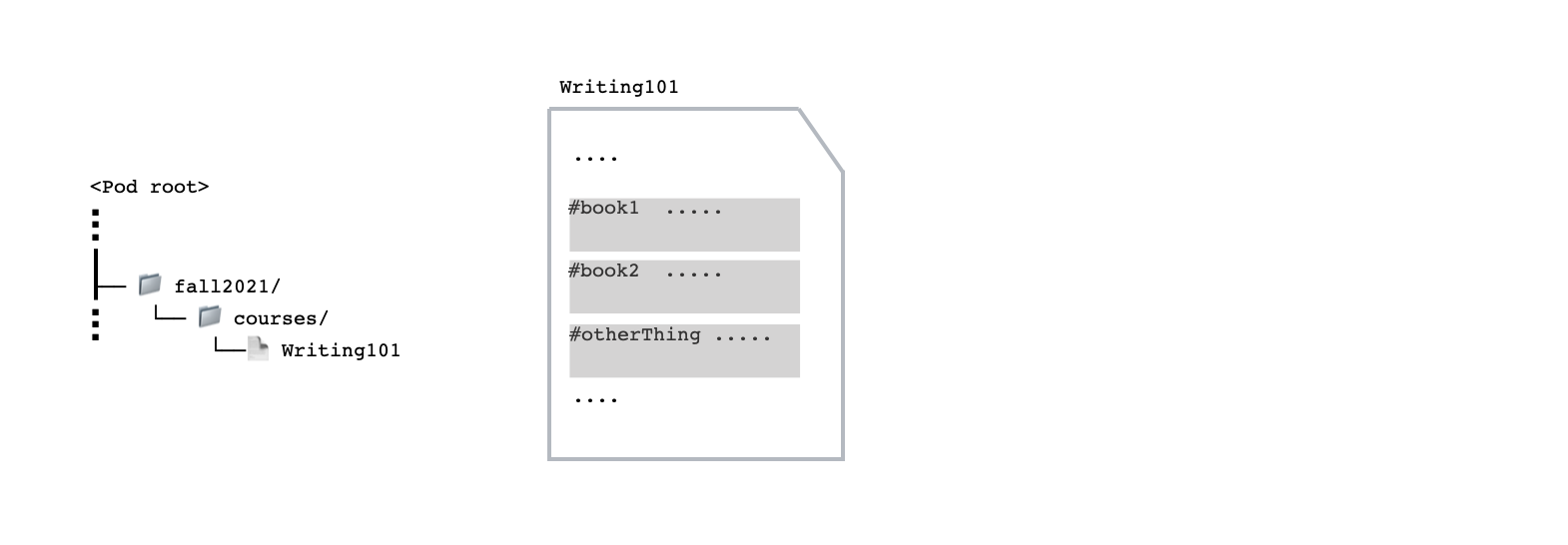
To continue with the course example, your Wallet Storage could have a `Container` named `fall2021/`; `fall2021/` contains another `Container` named `courses/`; `courses/` contains a `SolidDataset` that corresponds to the course `Writing101`; and the `Writing101` contains data about the `Things` (such as the books) for that course.

<figure><img src="https://2584838151-files.gitbook.io/~/files/v0/b/gitbook-x-prod.appspot.com/o/spaces%2FLMLxFYifBOpjrf8rQMX1%2Fuploads%2Fgit-blob-cdbb596a1d9bf4aef23d5af8c45cb8564ba91828%2Fpod-structure.png?alt=media" alt=""><figcaption></figcaption></figure>

### URL as Identifiers

Every Container, SolidDataset, and Thing has a unique URL that serves as its identifier.

* Container URLs always ends with a forward slash ( `/` ). This slash indicates that the URL points to a Container rather than a specific file (Thing) or dataset (SolidDataset).
* SolidDataset URLs are built from their location within the container hierarchy, followed by the SolidDataset's name.
* Thing URLs are also built from their location within the container hierarchy, followed by the SolidDataset they belong to, with a hash fragment (`#`) added before the name of the Thing itself.

Consider the following content in a Pod where the Pod URL is `https://storage.inrupt.com/{rootContainer}/`:

<figure><img src="https://2584838151-files.gitbook.io/~/files/v0/b/gitbook-x-prod.appspot.com/o/spaces%2FLMLxFYifBOpjrf8rQMX1%2Fuploads%2Fgit-blob-cdbb596a1d9bf4aef23d5af8c45cb8564ba91828%2Fpod-structure.png?alt=media" alt=""><figcaption></figcaption></figure>

<table><thead><tr><th width="151.5">Name</th><th width="133">Type</th><th>URL</th></tr></thead><tbody><tr><td><code>fall2021/</code></td><td>Container</td><td><code>https://storage.inrupt.com/{rootContainer}/fall2021/</code></td></tr><tr><td><code>courses/</code></td><td>Container</td><td><code>https://storage.inrupt.com/{rootContainer}/fall2021/courses/</code></td></tr><tr><td><code>Writing101</code></td><td>SolidDataset</td><td><code>https://storage.inrupt.com/{rootContainer}/fall2021/courses/Writing101</code></td></tr><tr><td><code>book1</code></td><td>Thing</td><td><code>https://storage.inrupt.com/{rootContainer}/fall2021/courses/Writing101#book1</code></td></tr><tr><td><code>book2</code></td><td>Thing</td><td><code>https://storage.inrupt.com/{rootContainer}/fall2021/courses/Writing101#book2</code></td></tr><tr><td><code>otherThing</code></td><td>Thing</td><td><code>https://storage.inrupt.com/{rootContainer}/fall2021/courses/Writing101#otherThing</code></td></tr></tbody></table>